RatingFacts Logo
  • Home
  • Categories
  • Reviews
  • Blogs
  • About Us
Loading...
ratingfacts logo

We believe truth should drive every business decision. Our platform empowers buyers to make confident decisions, but they are also a goldmine for vendors who want to authentically engage prospects on RatingFacts and beyond. That is why we built our business on quality and trust. Whether you're a buyer or a vendor, you know we have your back.

Rating Facts

  • Home
  • About us
  • Contact Us
  • Reviews
  • Terms of Use

For Users

  • Categories
  • Blogs
  • Security
  • Privacy Policy
  • FAQ

Follow Us

© 2025 Rating Facts. All rights reserved.

  1. Home
  2. All
  3. Veed
Veed

Veed Reviews

VEED - Edit, Record & Livestream Video - Online

All

veed.ioVisit Official Website

3.54

137 reviews

Good Rating

Based on authentic user experiences

3.54

137 reviews

Good Rating

Based on authentic user experiences

Rated 3.54 out of 5 by 137 Happy Customers

41.61%
14.6%
14.6%
14.6%
14.6%

Coaching con Jesus

N/A

2 years ago

Generating subtitles is easy

The user interface is very user-friendly and easy to use the subtitles are very accurate which makes me rely on your subtitles in my videos

  • Loading...

Company Overview

Veed: An Online Video Editing Platform for Everyone

Veed.io is a comprehensive, cloud-based video editing platform designed to make professional-quality video creation accessible to users of all skill levels. Operating entirely within a web browser, Veed eliminates the need for complex software downloads or installations, offering a streamlined and intuitive workflow for a wide range of video production needs. The platform positions itself as a versatile tool for content creators, marketers, educators, businesses, and social media enthusiasts who require efficient and powerful editing capabilities without a steep learning curve.

Core Features and Functionality

At its heart, Veed provides a robust set of editing tools that cater to modern content demands. Users can easily trim, cut, and merge video clips with a simple drag-and-drop interface. Beyond basic editing, the platform excels in several key areas that address common challenges in video production:

  • Subtitles and Captions:Veed offers highly accurate, AI-powered automatic subtitle generation. This feature supports multiple languages and allows for easy customization of text style, positioning, and timing, which is crucial for accessibility and social media engagement.
  • Audio Editing:The platform includes tools for cleaning up audio, reducing background noise, and adding background music from a built-in library or user uploads. Its text-to-speech functionality can generate voiceovers in various voices and accents.
  • Screen and Webcam Recording:Users can record their screen, webcam, or both directly within the browser, making it an all-in-one solution for creating tutorials, presentations, and reaction videos.
  • Templates and Branding:To speed up creation, Veed provides a library of customizable templates for intros, outros, social media stories, and promotional content. Users can also save brand kits with logos, colors, and fonts for consistent branding.

Specialized Tools for Efficiency

Veed distinguishes itself with a suite of specialized, AI-driven tools designed to automate complex tasks. These include features for automatically removing silent pauses from videos, adding eye-catching subtitles optimized for social media platforms, and even translating video content into different languages. The platform also supports collaborative editing, allowing teams to work on projects simultaneously, leave comments, and share feedback in real time, which is invaluable for business and educational environments.

Output and Integration

Finished videos can be exported in various resolutions and formats suitable for different platforms like YouTube, Instagram, TikTok, and LinkedIn. Veed integrates smoothly with other tools and workflows, enabling users to import media from cloud storage services and export directly to social media or download for offline use. The platform operates on a freemium model, offering a capable free tier with watermarking and usage limits, alongside several paid subscription plans (Pro, Business) that unlock higher export quality, longer video lengths, advanced features, and commercial licensing.

Target Audience and Use Cases

Veed's user-friendly design makes it ideal for entrepreneurs creating marketing videos, educators producing online course content, podcasters turning audio into video clips, and social media managers needing to repurpose content quickly. Its balance of simplicity for beginners and depth for more advanced users allows it to serve as both a primary editing suite for casual creators and a valuable supplementary tool for professionals seeking rapid edits and automated processes like subtitling.

In summary, Veed.io is a powerful, web-native solution that democratizes video editing by combining an accessible interface with a rich feature set focused on automation, collaboration, and the specific demands of digital content creation in today's online landscape.
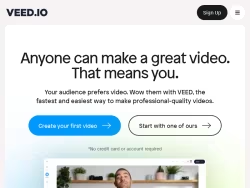
About Veed

VEED - Edit, Record & Livestream Video - Online

An online video suite for professionals. Record, edit and stream your videos in the cloud. The fastest and easiest way to make professional-quality videos.
United States
veed.io

FAQ

Veed.io is a comprehensive, cloud-based online video editing platform designed to make professional-quality video creation accessible to users of all skill levels. It operates entirely within a web browser, eliminating the need for software downloads. The platform is a versatile tool for content creators, marketers, educators, businesses, entrepreneurs, social media managers, and enthusiasts who require efficient and powerful editing capabilities without a steep learning curve.

Veed's core features include a robust set of editing tools such as trimming, cutting, and merging clips via a drag-and-drop interface. It excels in AI-powered automatic subtitle generation for multiple languages, audio editing tools for noise reduction and adding music, text-to-speech voiceovers, and integrated screen and webcam recording. The platform also offers customizable templates and brand kits for consistent visual identity.

Pamela

N/A

2 years ago

I absolutely love Veed io

Very handy and simple for use even Newbee can create great videos also providing good video editing subtitle generator and yet much more to explore for me KUDOS

Emmanuel Argonza

N/A

2 years ago

All great all exciting all free

Generating subtitles is easy but sometimes I have to correct the spelling but it s Ok

Laiba Razzaq

N/A

2 years ago

Veed is a true gem in the world of

I absolutely love Veed io I have had a pro membership since 2021 and find it to be my most helpful tool for creating e-learning videos editing videos creating subtitles and now with the new AI features it is a must-have As a very small business it is important to me to have a professional appearance at an affordable cost and Veed does this very well Customer service is amazing and very responsive Anything creative that I do for training or courses is enhanced by Veed this is a great tool for anyone creating distributing editing and manipulating videos Veed has a great selection of music and images but also allows you to upload custom images videos and text to embed your own style into your work I could continue but I actually do need to work

DR NURUL NISA KHAIROL AZMI

N/A

2 years ago

Very helpful

Veedio has been very useful to me making great subtitles for my videos at little to no effort at all Thank you very much You guys are amazing

Road Kale

N/A

2 years ago

Veed io allowed us to quickly create close captioning

Veed is a true gem in the world of video editing earning its well-deserved 5-star rating Its user-friendly interface simplifies the editing process for both beginners and pros offering a versatile range of features to suit various projects Efficiency is key with Veed ensuring polished and professional videos without compromising on creative freedom With a reliable performance and a toolkit that encourages experimentation Veed stands out as a go-to app for anyone looking to enhance their video content effortlessly It s more than an editing tool it s a creative companion that deserves every bit of its 5-star acclaim

Temi Yousef

N/A

2 years ago

It s awesome

Veed io allowed us to quickly incorporate French close captioning to short videos This is an important feature for accessibility I specifically enjoyed the feature to auto generate the captions Then it was a matter of editing the text

Blue Daposala Generalao

N/A

2 years ago

It can help for especially I made the Christian Songs Video Lyrics

It can help for especially I made the Christian songs video with lyrics Thank you so much for this apps I hope we can have partnership and collaboration and it can big help for my project God bless

Samuel Tuominen

N/A

2 years ago

A versatile video editing tool for the age of AI

Veed is an excellent service if you need versatile video editing tool For example video speech transcription and its translation capabilities have impressed with the speed and quality of the service Automatic speech transcription also includes text punctuation The latest service where you can create an Avatar reader for your text is also amazingly natural as if it were a real person Amazing how much AI has already revolutionised and will revolutionise our world hopefully for the good

Diego Brise o

N/A

2 years ago

So many hours saved

Incredible saved me hours per day when I can buy the premium version I ll definitely do it

Veed offers highly accurate, AI-powered automatic subtitle generation. This feature supports multiple languages and allows for extensive customization of text style, positioning, and timing. It is designed to enhance video accessibility and improve engagement on social media platforms by making content easily consumable with or without sound.

Yes. Veed includes built-in functionality for recording your screen, webcam, or both directly within the web browser. This makes it an all-in-one solution for creating tutorials, presentations, training videos, and reaction content without needing separate recording software.

Yes, Veed supports collaborative editing. This feature allows multiple team members to work on video projects simultaneously. Users can leave comments, share feedback in real time, and manage edits collectively, which is particularly valuable for business, educational, and marketing team environments.

Veed includes several specialized AI tools designed to automate complex tasks. These include features for automatically removing silent pauses from videos, generating eye-catching subtitles optimized for social media, and translating video content into different languages. These tools aim to significantly speed up the editing process.

Finished videos can be exported in various resolutions and formats suitable for platforms like YouTube, Instagram, TikTok, and LinkedIn. Veed integrates with cloud storage services for media import and allows for direct export to social media or download for offline use. The platform is designed to fit smoothly into various content creation workflows.

Veed operates on a freemium model. It offers a capable free tier that includes core features but may apply a watermark and have usage limits, such as on video length or export quality. Paid subscription plans, including Pro and Business tiers, unlock higher export quality, longer video lengths, advanced features like commercial licensing, and removal of watermarks.

Yes, Veed is suitable for professional and business use. Its balance of an intuitive interface and advanced features, such as brand kits, collaborative editing, and high-quality exports, makes it a valuable tool for entrepreneurs, marketers, and social media managers. The Business plan specifically caters to commercial needs with features for team collaboration and branding.

No installation is required. Veed is a fully web-native, cloud-based platform. All editing, recording, and exporting functions are performed directly within a compatible web browser, ensuring accessibility from various devices without the need for complex software downloads or system updates.

Related Companies

Wave

Wave

2.33(3)

wave.video

Veo

Veo

3.56(139)

veo.co

Mybeat

Mybeat

4.20(5)

mybeat.io

Invideo

Invideo

3.76(116)

invideo.io

Happyevd

Happyevd

5.00(2)

happyevd.com

Streamyard

Streamyard

2.60(10)

streamyard.com

Vevox

Vevox

4.48(93)

vevox.com

Vidpros

Vidpros

5.00(13)

vidpros.com

Indiev

Indiev

4.98(61)

indiev.org

Medal

Medal

3.36(61)

medal.tv

Vidboard

Vidboard

4.95(57)

vidboard.ai

Clipchamp

Clipchamp

3.57(140)

clipchamp.com

Echowave

Echowave

4.46(61)

echowave.io

Videostudiopro

Videostudiopro

1.40(10)

videostudiopro.com

Flexclip

Flexclip

3.57(138)

flexclip.com

Vedzzy

Vedzzy

5.00(7)

vedzzy.com

Streamingvideoprovider

Streamingvideoprovider

4.69(13)

streamingvideoprovider.com

Vynemedia

Vynemedia

5.00(4)

vynemedia.com

Veefly

Veefly

0.00(0)

veefly.com

Vidlii

Vidlii

2.51(37)

vidlii.com